

OrderLogic elegantly helps you set up order limits such as minimum or maximum quantities per product
- Stores using it
- 1,611 0.1% of stores we track
- Rating
- 4.1 / 5 49 reviews
- Price
- $4 / mo Free trial
- Top country
- United States 807 stores
Screenshots
About OrderLogic ‑ Min & Max Limits
OrderLogic elegantly helps you set up order limits such as minimum or maximum quantities per product
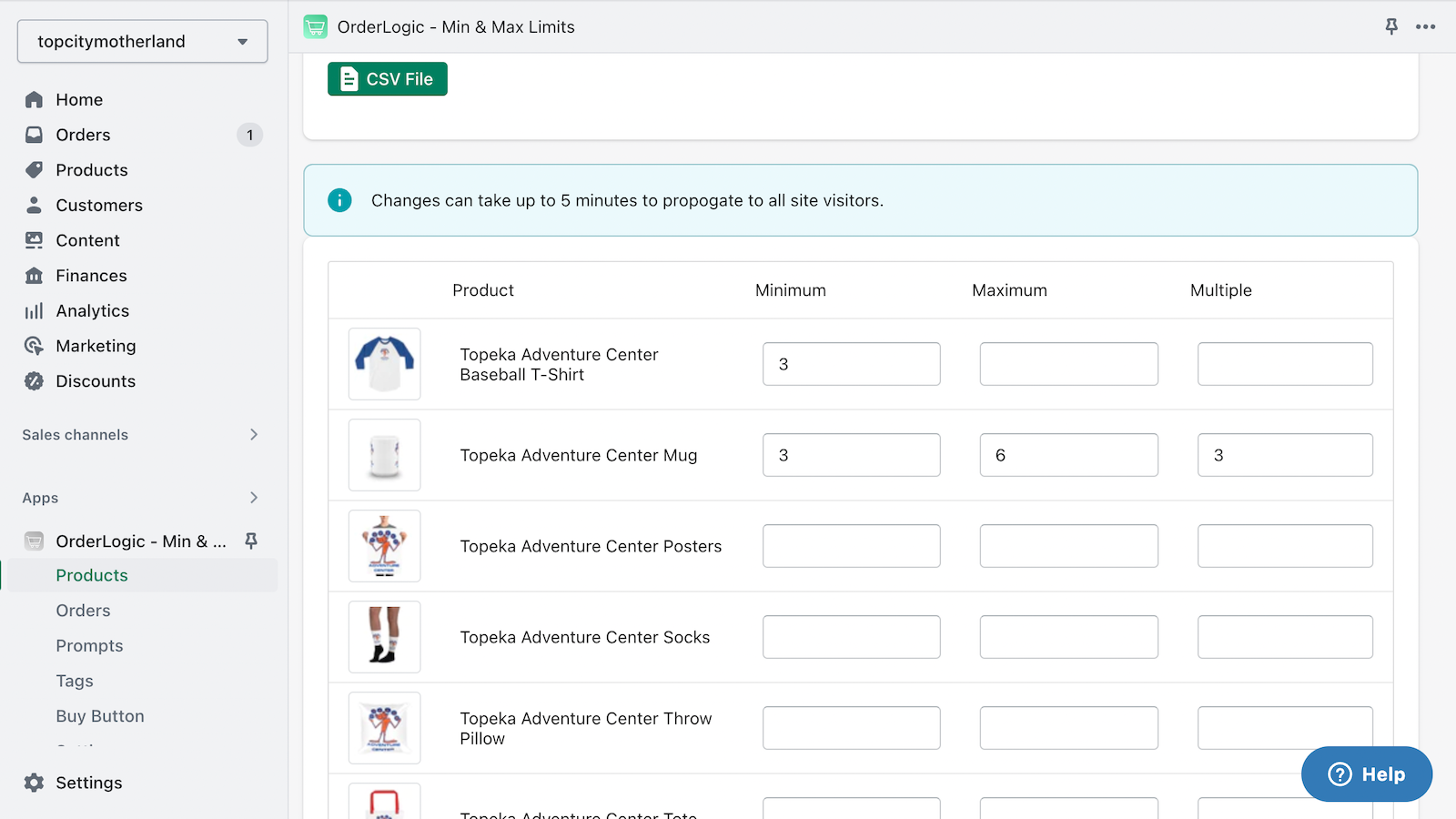
Define min and max product quantities, with a simple interface to set limits on customer orders. Selling a prepackaged set of 6? No problem! Advanced plans offer support for the Buy Button or for setting limits based on a product tag across a group of products. No coding required. Quick and easy setup in minutes. A professional and stylish pop up modal alerts your customers of changes needed to the cart, and when possible allows them to fix their cart quantities with a single click!
- Specify minimum and maximum constraints for products.
- Specify minimum or maximum orders by price or item quantity limits.
- Create limits based on product tags applied individually or as a group.
- Quick, easy setup. No coding required.
Features
- Cart-based
- Collection-specific
- Custom messages
- Max quantity
- Min quantity
- Pop-ups
- Price-based
- Product page alerts
OrderLogic ‑ Min & Max Limits pricing
Free trial · From $4 / month. Prices in USD; check the App Store for the latest.
-
Standard
$4 / month
- Product Constraints
- Order Constraints
-
Premium
$9 / month
- Product Constraints
- Order Constraints
- Tag Constraints
Shopify stores using OrderLogic ‑ Min & Max Limits
We detect OrderLogic ‑ Min & Max Limits on 1,611 live Shopify stores, 0.1% of all the stores we track. Most of them are in United States.
- Stores using it
- 1,611
- Share of stores
- 0.1%
- Median products
- 88
- Countries
- 12+
| # | Store | Location | Products | Theme | Scan |
|---|---|---|---|---|---|
| 1 | Andy Frisella andyfrisella.com | Fenton, United States | 93 | Turbo | Scan |
| 2 | Citizens of Humanity citizensofhumanity.com | Huntington Park, United States | 1,127 | Dawn | Scan |
| 3 | Yale Home shopyalehome.com | Oak Creek, United States | 149 | — | Scan |
| 4 | HIQ Nutrition takehiq.com | İstanbul, Turkey | 124 | Ecomify | Scan |
| 5 | Milk Bar milkbarstore.com | New York, United States | 56 | Milk Bar | Scan |
| 6 | Jeni's Splendid Ice Creams jenis.com | Columbus, United States | 105 | Zest | Scan |
| 7 | ALOHA aloha.com | Darien, United States | 62 | — | Scan |
| 8 | Limited Run Games limitedrungames.com | Apex, United States | 3,108 | LRG 2024 | Scan |
| 9 | Max Brenner | USA maxbrenner.com | New York, United States | — | Venue | Scan |
| 10 | El Croquis elcroquis.es | El Escorial, Spain | 1,008 | — | Scan |
See the top 100 stores using OrderLogic ‑ Min & Max Limits
Where these stores are
What these stores sell
Installed alongside OrderLogic ‑ Min & Max Limits
The apps most often found on the same stores: the share of 1,000 stores running OrderLogic ‑ Min & Max Limits that also run each one.
- Shop 66.6%
- Klaviyo: Email Marketing & SMS 23.4%
- Mailchimp Email SMS Marketing 21.8%
- Pinterest 18.1%
- Mailchimp Forms: Capture Leads 16.6%
- Judge.me Product Reviews 13.1%
- Brevo PushOwl: Email,Push,SMS 9.8%
- Minmaxify Order Limits 9.7%
- Bundle & Upsell AI ‑ LimeSpot 8.9%
- Google & YouTube 8.4%
- Shopify Product Reviews 8.2%
- Rivyo : Reviews & Loyalty 8.1%










FAQ
OrderLogic ‑ Min & Max Limits: FAQ
OrderLogic elegantly helps you set up order limits such as minimum or maximum quantities per product
No. Plans start at $4 a month, with a free trial.
ShopScan detects OrderLogic ‑ Min & Max Limits on 1,611 live Shopify stores, 0.1% of all the stores we track. Most are in United States (807).
Shop (66.6%), Klaviyo: Email Marketing & SMS (23.4%), Mailchimp Email SMS Marketing (21.8%) are the apps most often installed on the same stores.
OrderLogic ‑ Min & Max Limits is built by Oiizes, based in United States, and launched in April 2016.
4.1 out of 5 from 49 reviews on the Shopify App Store.